Home > User Interface > Results Processing > Fatigue Analysis > Fatigue Analysis Setup > General Data Form
General tab
The General tab includes the 4 following frames:
-
Type of analysis
-
Calculation method
-
Type of line
-
Results storage options
Details on the behavior of the tab are given below.
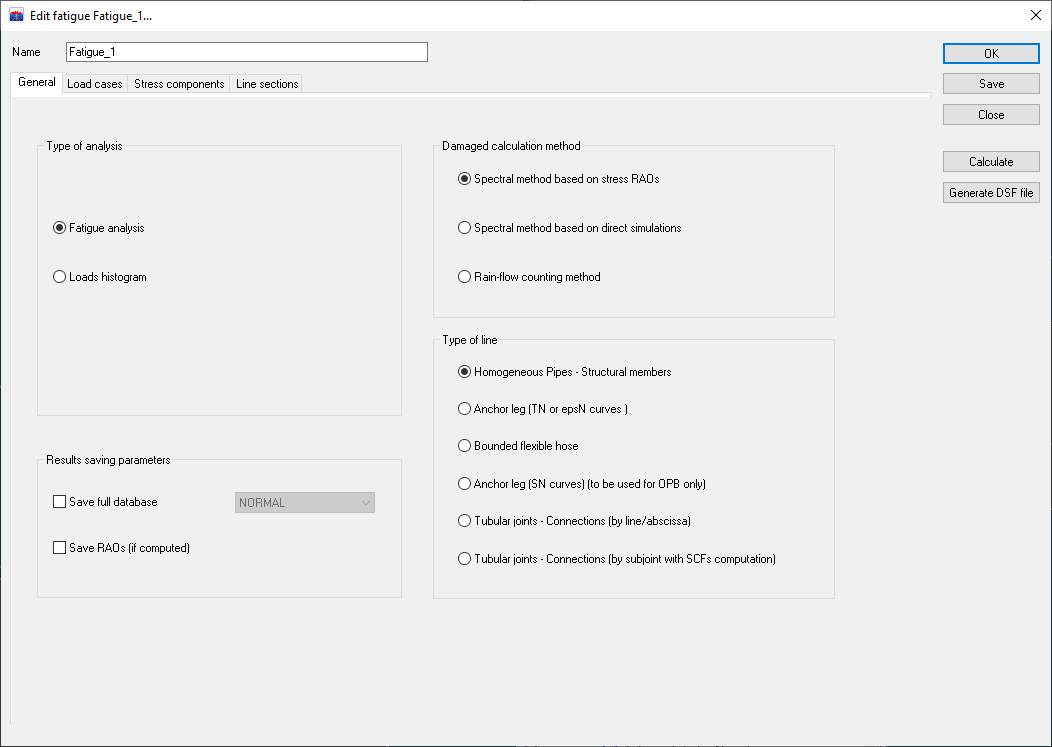
Type of Analysis
This frame includes 3 radio-buttons used to select which type of post- processing is to be performed between Spectrum response analysis, Fatigue Analysis, and Loads Histograms.
The other 3 main tab sheets and other frames from the General tab shall display dynamically as a function of the Type of Analysis option selected.
Calculation method
The user must select either:
- the Spectral method based on stress RAOs
- the Spectral method based on direct simulations
- the Rain-flow counting method.
Type of line
In this frame, you may select the type of line on which the fatigue analysis will be carried on. Available types of lines for fatigue post-processing include Steel risers, Anchor legs and Bounded flexible hoses. The type of line will then drive whether the calculation of damage must be done based on S-N or T-N curves, and whether stress will be calculated considering a Rigid Pipe type or Flexible Hose type.
More details for fatigue on Anchor leg (SN curves) can be can be found here.
The Tubular joints - Connections (by subjoint) section gives information on how to perform fatigue on tubular intersections by subjoint with calculated or user-defined SCF.
Result saving parameters
Select either the Save full database or Save RAOs (if computed) options.
